
MIDI controllers are the physical link between your ideas and your DAW, and the right one can speed up music production more than any plugin upgrade. For most producers, the Akai APC Key 25 MK2 is the best overall choice because it combines a keyboard, clip-launching pads, and deep Ableton Live integration at a price beginners can justify. If you already play keys seriously, the Akai MPK Mini Plus adds real faders, a sequencer, and MIDI ports, while budget-focused beatmakers should look at the APC Mini MK2, which delivers 64 pads for under a hundred dollars. The core tradeoff in this category is straightforward: pad-focused controllers excel at beatmaking and clip launching, keyboard controllers excel at melodies and basslines, and control surfaces with faders excel at mixing — but almost no affordable unit does all three well. Size, key count, and software bundles also move the price considerably. Keep reading for the full breakdown of all 13 controllers.

Get audio and creator gear delivered free with Prime
- Fast, free delivery on millions of items
- Prime Video, Amazon Music and more included
- Member-only deals all year
Complete the kit


Key Takeaways
- The lineup splits into three distinct camps — Akai‘s Ableton-focused APC line, portable keyboard controllers, and utility control surfaces — and the best pick depends entirely on which workflow dominates your productions.
- Software bundles quietly drive most of the value in this price range: the PreSonus ATOM and APC Key 25 MK2 include DAWs and sound libraries that would cost more than the hardware itself.
- The Akai MPK Mini Play MK3 is the only option here with a built-in speaker and battery workflow, making it the sole choice for producing away from a computer.
- Pads, keys, and faders rarely coexist under $150; producers who want all three without going premium should accept the APC Key 25 MK2’s compromises rather than expecting a perfect all-rounder.
- Bluetooth control (Korg NanoKONTROL Studio) trades latency and reliability for cable-free convenience — worth it for mixing on a couch, risky for performance-critical playing.
| Akai Professional APC64 USB MIDI Pad Controller | 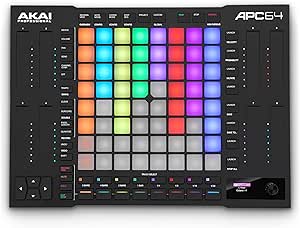 | Best Overall | Pads: 64 RGB velocity-sensitive with poly aftertouch | Touch Strips: 8 assignable | Built-in Sequencer: 8-track, 32-step | VIEW LATEST PRICE | See Our Full Breakdown |
| Korg NanoKONTROL Studio Bluetooth/USB MIDI Control Surface with 8 Faders |  | Best for Mobile and Wireless Setups | Faders: 8 mixer channels | Total Controls: 45 assignable controls | Connectivity: Bluetooth, USB | VIEW LATEST PRICE | See Our Full Breakdown |
| PreSonus ATOM Production & Performance MIDI Pad Controller |  | Best Value Pad Controller | Pads: 16 velocity- and pressure-sensitive RGB | Assignable Buttons: 20 | Rotary Encoders: 4 | VIEW LATEST PRICE | See Our Full Breakdown |
| Akai Professional APC Mini MK2 USB MIDI Pad Controller |  | Best Budget Clip Launcher | Pad Matrix: 8×8 RGB pads | Faders: 9 (8 assignable + 1 master) | Connectivity: USB, plug-and-play, bus powered | VIEW LATEST PRICE | See Our Full Breakdown |
| Akai Professional APC40 MKII USB MIDI Pad Controller |  | Best for Live Performance | Clip-Launch Matrix: 5×8 RGB pads | Faders: 9 channel faders | Control Knobs: 8 control knobs, 8 device controls | VIEW LATEST PRICE | See Our Full Breakdown |
| Akai Professional LPD8 USB MIDI Pad Controller |  | Best Ultra-Portable Pad Controller | Pads: 8 RGB-backlit MPC drum pads | Knobs: 8 assignable Q-Link knobs | Preset Slots: 4 programmable presets | VIEW LATEST PRICE | See Our Full Breakdown |
| M-AUDIO Keystation Mini 32 MK3 USB MIDI Controller |  | Best Budget Keyboard for Beginners | Number of Keys: 32 | Key Type: Velocity-sensitive mini keys | Connectivity: USB, bus-powered | VIEW LATEST PRICE | See Our Full Breakdown |
| Akai Professional MPK Mini MK3 25-Key USB MIDI Keyboard Controller |  | Best All-in-One Compact Controller | Number of Keys: 25 mini velocity-sensitive keys | Pads: 8 MPC-style backlit velocity-sensitive pads | Knobs: 8 assignable 360-degree knobs | VIEW LATEST PRICE | See Our Full Breakdown |
| Akai Professional MPK Mini Play MK3 25-Key USB MIDI Keyboard Controller |  | Best for Playing Away from the Computer | Number of Keys: 25 | Pads: 8 velocity-sensitive drum pads | Built-in Speaker: Yes | VIEW LATEST PRICE | See Our Full Breakdown |
| Native Instruments Komplete Kontrol M32 Controller Keyboard |  | Best for Native Instruments Ecosystems | Number of Keys: 32 | Display: OLED | Controls: Touch-sensitive knobs | VIEW LATEST PRICE | See Our Full Breakdown |
| Akai Professional MPK Mini Plus 37-Key USB MIDI Keyboard Controller |  | Best for Standalone Production | Number of Keys: 37 mini keys | Octaves: 3 full octaves | Pads: 8 RGB MPC pads | VIEW LATEST PRICE | See Our Full Breakdown |
| Akai Professional APC Key 25 MK2 25-Key USB MIDI Keyboard Controller |  | Best for Ableton Live Users | Number of Keys: 25 velocity-sensitive | Octaves: 2 | Pad Matrix: 5×8 RGB pads | VIEW LATEST PRICE | See Our Full Breakdown |
| Arturia MiniLab 3 Universal MIDI Controller, White |  | Best Compact All-Rounder | Number of Keys: 25 velocity-sensitive | Pads: 2 banks of 8 velocity/pressure-sensitive RGB pads | Controls: 8 rotary encoders, clickable browsing knob | VIEW LATEST PRICE | See Our Full Breakdown |
| music production MIDI controller | Connectivity | Included Software | Pads | Number of Keys |
|---|---|---|---|---|
| Akai Professional APC64 USB MI | USB-C, MIDI in/out | Ableton Live Lite, VST/AU plug-ins, 1GB samples | 64 RGB velocity-sensitive with poly aftertouch | — |
| Korg NanoKONTROL Studio Blueto | Bluetooth, USB | — | — | — |
| PreSonus ATOM Production & Per | USB | Studio One Artist, Ableton Live Lite, Studio Magic Plug-In Suite | 16 velocity- and pressure-sensitive RGB | — |
| Akai Professional APC Mini MK2 | USB, plug-and-play, bus powered | Ableton Live Lite, Hybrid 3, Mini Grand, Velvet | — | — |
| Akai Professional APC40 MKII U | USB-powered, plug-and-play Mac and PC | Ableton Live Lite, Puremagnetik Effect Racks, Hybrid 3, TubeSynth, sample packs | — | — |
| Akai Professional LPD8 USB MID | Full-size USB, bus-powered | — | 8 RGB-backlit MPC drum pads | — |
| M-AUDIO Keystation Mini 32 MK3 | USB, bus-powered | MPC Beats | — | 32 |
| Akai Professional MPK Mini MK3 | USB powered | MPC Beats, 3 virtual instruments, 2GB sound content | 8 MPC-style backlit velocity-sensitive pads | 25 mini velocity-sensitive keys |
| Akai Professional MPK Mini Pla | USB | MPC Beats, MPC expansion packs, AIR Keyboards, Electric, Melodics lessons | 8 velocity-sensitive drum pads | 25 |
| Native Instruments Komplete Ko | USB 2.0 | Synths, basses, drums, effects, Ableton Live 10 Lite | — | 32 |
| Akai Professional MPK Mini Plu | USB, MIDI I/O, CV/Gate | — | 8 RGB MPC pads | 37 mini keys |
| Akai Professional APC Key 25 M | USB powered | Ableton Live Lite, Hybrid 3, Mini Grand, Velvet | — | 25 velocity-sensitive |
| Arturia MiniLab 3 Universal MI | USB | — | 2 banks of 8 velocity/pressure-sensitive RGB pads | 25 velocity-sensitive |
More Details on Our Top Picks
Akai Professional APC64 USB MIDI Pad Controller
The APC64 earns the top spot because it refuses to pick a lane. With 64 RGB pads with poly aftertouch, eight touch strips, and a built-in 8-track step sequencer, this model works as a clip launcher, a drum instrument, and a hardware control hub all at once. Compared with the APC40 MKII, it adds CV/Gate outputs and MIDI I/O, which means modular synth owners and hardware-centric producers get a controller that speaks to gear outside the computer — something no other Akai pad controller in this lineup does. The tradeoff is real, though: the depth that makes it powerful also makes setup intimidating, and much of its value evaporates if you are not an Ableton Live user. This pick makes the most sense for someone building a long-term hybrid studio rather than a first controller.
Pros:- 64 velocity-sensitive RGB pads with poly aftertouch for expressive drumming and melodic work
- Built-in 8-track step sequencer enables standalone performance without the computer
- CV/Gate and MIDI I/O integration for hardware synths and modular rigs
- Generous bundled software including Ableton Live Lite and 1GB of samples
Cons:- Complex setup and mapping process can overwhelm newer producers
- Full functionality is heavily tied to Ableton Live
- Premium price puts it well above compact alternatives like the APC Mini MK2
Best for: Intermediate-to-advanced Ableton Live producers running hybrid setups with hardware synths or modular gear
Not ideal for: Beginners or users of other DAWs — the steep setup and Ableton-centric workflow will feel like overpaying for unused features
- Pads:64 RGB velocity-sensitive with poly aftertouch
- Touch Strips:8 assignable
- Built-in Sequencer:8-track, 32-step
- Connectivity:USB-C, MIDI in/out
- Additional Outputs:8 CV/Gate
- Included Software:Ableton Live Lite, VST/AU plug-ins, 1GB samples
- Power:USB bus powered
Our verdict“Buy this if you want one deep, hardware-friendly controller that can anchor a hybrid Ableton studio for years.”
Korg NanoKONTROL Studio Bluetooth/USB MIDI Control Surface with 8 Faders
While most controllers in this roundup chase pads and keys, the NanoKONTROL Studio solves a different problem: mixing away from the desk. Its eight physical faders and transport controls make it a genuine mini mixing surface, and the Bluetooth connectivity means you can sit on a couch with a laptop — or even an iPad — and still ride levels hands-on. Compared with the APC Mini MK2, which is tethered by USB, this model wins on placement freedom but loses badly on clip launching; there is no pad grid here at all. The faders are also smaller than full-size console faders, so engineers wanting precision moves may find the throw short. For laptop-based producers tired of mouse-mixing, this option stands out for what it omits as much as what it includes.
Pros:- Bluetooth wireless connectivity plus USB for flexible placement
- Eight real faders for tactile mixing and automation
- Works across PC, Mac, and iOS with major DAWs including Pro Tools and FL Studio
- Slim, lightweight body slips into a laptop bag
Cons:- No pads or keys, so it is strictly a control surface
- Setup requires manual reading to map controls correctly to your DAW
- Mini faders lack the resolution of larger control surfaces
Best for: Laptop and iOS producers who want physical faders and transport control without cables cluttering a mobile workspace
Not ideal for: Finger-drummers and clip-launch performers — with no pads, it cannot replace a pad controller like the ATOM or APC line
- Faders:8 mixer channels
- Total Controls:45 assignable controls
- Connectivity:Bluetooth, USB
- Compatibility:PC, Mac, iOS
- Supported DAWs:Ableton Live, Avid Pro Tools, FL Studio and more
- Power:USB or battery-powered via Bluetooth mode
Our verdict“This is the pick for producers who mix on the move and want faders without a desk full of cables.”
PreSonus ATOM Production & Performance MIDI Pad Controller
The PreSonus ATOM lands in the value slot because its bundle punches above its price. Studio One Artist alone costs a meaningful chunk of what this controller sells for, and the pads themselves — 16 velocity- and pressure-sensitive RGB pads — feel closer to Akai’s premium tier than budget gear. Compared with the APC Mini MK2, the ATOM gives you pressure sensitivity and four rotary encoders for tweaking synths and effects, where the Mini focuses purely on clip launching. The flip side: eight fewer pads per row and no faders mean mixing control is minimal, and USB-only connectivity limits hardware setups. This model is better suited to producers who play parts in by hand rather than arrange entire live sets, especially anyone planning to build a workflow around Studio One.
Pros:- Velocity- and pressure-sensitive pads enable expressive dynamics
- Studio One Artist, Ableton Live Lite, and the Studio Magic plug-in suite included
- 20 assignable buttons and 4 encoders give real parameter control for the price
- Note Repeat and Full Velocity modes support beat-making workflows
Cons:- Only 16 pads, limiting clip-launching capacity
- No faders for mixer control
- USB-only connectivity with no MIDI ports for external hardware
Best for: Budget-conscious producers who want expressive, pressure-sensitive pads and a full DAW bundled in one purchase
Not ideal for: Ableton Live clip-launching performers — 16 pads cannot run a full session grid the way the APC40 MKII or APC Mini MK2 can
- Pads:16 velocity- and pressure-sensitive RGB
- Assignable Buttons:20
- Rotary Encoders:4
- Included Software:Studio One Artist, Ableton Live Lite, Studio Magic Plug-In Suite
- Connectivity:USB
- Performance Modes:MIDI keyboard mode, Note Repeat, Full Velocity
Our verdict“The ATOM is the smart buy for hands-on beat makers who want quality pads and serious software without the flagship price.”
Akai Professional APC Mini MK2 USB MIDI Pad Controller
If your whole goal is launching clips in Ableton Live for as little money as possible, the APC Mini MK2 is hard to beat. Its 8×8 RGB pad matrix mirrors a full Ableton session view, and the nine faders (eight channels plus a master) give it a mixing capability the PreSonus ATOM lacks entirely. Next to the APC40 MKII, the tradeoffs are obvious: smaller pads, fewer dedicated knobs, and no crossfader — but it costs a fraction as much and fits in a backpack. The pads are not pressure-sensitive, so finger-drummers will feel the difference immediately. Without a display, you will also lean on your computer screen for parameter feedback. This pick makes the most sense as a first clip-launching controller, or as a portable second unit for gigs.
Pros:- Full 8×8 RGB pad grid matches Ableton’s session view at an entry-level price
- Nine faders cover channel and master level control
- Compact and bus-powered for easy studio-to-stage portability
- Includes Ableton Live Lite plus several virtual instruments
Cons:- Pads are not pressure or aftertouch sensitive
- No display or dedicated knobs for detailed parameter control
- Deep integration is largely limited to Ableton Live
Best for: Ableton Live beginners and gigging producers who want a full 64-pad session grid and basic faders on a tight budget
Not ideal for: Producers who want expressive playing — the pads lack pressure sensitivity, and non-Ableton users will fight the mapping
- Pad Matrix:8×8 RGB pads
- Faders:9 (8 assignable + 1 master)
- Connectivity:USB, plug-and-play, bus powered
- Included Software:Ableton Live Lite, Hybrid 3, Mini Grand, Velvet
- Primary DAW:Ableton Live
Our verdict“The cheapest credible way into clip-launching, provided Ableton Live is your DAW and expressive drumming is not the priority.”
Akai Professional APC40 MKII USB MIDI Pad Controller
For performers, the APC40 MKII remains the benchmark. Its 5×8 clip-launch matrix, nine channel faders, eight device knobs, and a dedicated crossfader put every live-move you need under your fingers at once — no page-diving mid-set. Compared with the APC64, it loses the step sequencer, aftertouch, and hardware connectivity, but its layout is arguably faster to learn and its reinforced fader design has proven itself on stages for years. Against the APC Mini MK2, the difference is control depth: knobs, a crossfader, and sturdier construction justify the higher price for anyone playing out regularly. The catch is that it is a single-DAW instrument at heart — outside Ableton Live, most of its smart mapping disappears, and the sheer control count can overwhelm a newcomer on day one.
Pros:- Complete live control surface: clip grid, 9 faders, 8 knobs, and an assignable crossfader
- Seamless out-of-the-box Ableton Live integration
- RGB grid with color coding makes set structure readable in dark venues
- Reinforced faders and road-tested build quality
Cons:- Limited usefulness outside Ableton Live
- Larger footprint than compact options like the APC Mini MK2
- Higher price than basic controllers, and the control count can overwhelm beginners
Best for: Ableton Live performers who need clip launching, mixing, and effect control simultaneously during live sets
Not ideal for: Producers on other DAWs or with limited desk space — the size and Ableton-first design waste much of its value
- Clip-Launch Matrix:5×8 RGB pads
- Faders:9 channel faders
- Control Knobs:8 control knobs, 8 device controls
- Crossfader:Yes, assignable
- Connectivity:USB-powered, plug-and-play Mac and PC
- Compatibility:Ableton Live 9.1.3 and later
- Included Software:Ableton Live Lite, Puremagnetik Effect Racks, Hybrid 3, TubeSynth, sample packs
Our verdict“If you perform live in Ableton, this is the controller built specifically for that job — everyone else should look smaller or cheaper.”
Akai Professional LPD8 USB MIDI Pad Controller
Not every producer needs a full keyboard, and the LPD8 makes that case convincingly. At roughly the size of a paperback, it slips into a laptop bag the way the PreSonus ATOM simply cannot, while still delivering eight genuine MPC pads with real Akai feel. The eight Q-Link knobs give it enough hands-on control to tweak filters and effects without touching a mouse.
The tradeoff is scale: compared with the APC64, eight pads feels cramped for finger-drumming performances or launching clips in Ableton. This pick makes the most sense for producers who already own a keyboard and need a pad-and-knob companion, or for anyone sketching beats in cafes and hotel rooms. Four preset slots let you save mappings per instrument, which softens the small footprint considerably.
Pros:- Genuinely pocketable with a sturdy build that survives bag travel
- True plug-and-play — no drivers, no external power, no setup friction
- Real MPC pads with velocity response at a low price point
- Four preset slots let you store mappings for different instruments
Cons:- Eight pads cap how complex your drum programming and finger-drumming can get
- No standalone mode or built-in sounds — it is useless without a computer
- No transport controls, so you still reach for the mouse constantly
Best for: Traveling producers and beat makers who need pads and knobs that fit in a backpack alongside a laptop
Not ideal for: Live performers or finger-drummers who need 16+ pads — the eight-pad layout is too tight for complex routines
- Pads:8 RGB-backlit MPC drum pads
- Knobs:8 assignable Q-Link knobs
- Preset Slots:4 programmable presets
- Connectivity:Full-size USB, bus-powered
- Compatibility:Mac and PC, all major DAWs
- Power:USB bus power, no drivers required
Our verdict“Buy the LPD8 if you want the smallest possible way to add MPC pads and knobs to an existing setup; skip it if pads are your primary playing surface.”
M-AUDIO Keystation Mini 32 MK3 USB MIDI Controller
For absolute beginners, the Keystation Mini 32 MK3 strips a MIDI keyboard down to what matters: playable keys, pitch bend, modulation, and nothing that inflates the price. Unlike the MPK Mini MK3, it skips drum pads and an arpeggiator entirely — which is exactly why it costs less and why a new producer can learn it in an afternoon rather than a weekend.
The bundled MPC Beats software and Melodics-style lessons mean you can record your first melody the day it arrives. That said, the mini keys are the honest compromise here. Compared with the Komplete Kontrol M32‘s smoother integration and display, this controller is barebones — no screen, no pads, no arpeggiator. But for someone testing whether music production sticks before spending more, that simplicity is the point, not a flaw.
Pros:- One of the lowest entry prices for a name-brand 32-key controller
- Pitch bend, modulation, and octave buttons cover real expressive basics
- Includes MPC Beats plus lesson content to get novices started
- Draws power over USB — genuinely grab-and-go with a laptop
Cons:- Mini keys feel shallow and cramped compared with full-size keybeds
- No pads, knobs for plugin control, or arpeggiator — upgrading is almost inevitable
- Velocity response is serviceable but not expressive enough for nuanced playing
Best for: First-time producers and students who want the cheapest reliable way to play melodies into a laptop
Not ideal for: Pianists or intermediate producers — the mini keys and 32-key span will frustrate anyone with real technique
- Number of Keys:32
- Key Type:Velocity-sensitive mini keys
- Connectivity:USB, bus-powered
- Compatibility:Windows and Mac
- Included Software:MPC Beats
- Controls:Pitch bend, modulation, octave buttons, volume knob, sustain button
Our verdict“The cheapest low-risk on-ramp into MIDI production — buy it to learn, and expect to outgrow it within a year.”
Akai Professional MPK Mini MK3 25-Key USB MIDI Keyboard Controller
The MPK Mini MK3 earns its place by combining three controllers in one footprint: keys, eight MPC pads, and eight knobs. Where the LPD8 gives you pads alone and the Keystation Mini 32 gives you keys alone, this model covers melody, drums, and plugin tweaking without any of them feeling like an afterthought. The built-in arpeggiator and NKS support push it past most budget rivals on capability per dollar.
The compromises are real, though. Twenty-five mini keys are tighter than the M32’s 32, and keyboard-first players will bump against the ceiling fast. Software setup for custom mappings is also more involved than the plug-and-play LPD8. Still, for a producer buying one device that does everything — plus a bundled starter kit with instruments and two months of Splice — nothing at this price matches its range.
Pros:- Keys, pads, and knobs together — rare at this price without major compromises
- Integrated arpeggiator with adjustable range and modes adds real creative value
- NKS support makes browsing Native Instruments libraries seamless
- Generous bundle: MPC Beats, three virtual instruments, 2GB of sounds, Splice access
Cons:- 25 mini keys are the tightest keyboard in this lineup for actual playing
- Full customization requires digging into the editor software
- Arpeggiator is functional but basic compared with higher-end controllers
Best for: Bedroom beat makers who want keys, pads, and knobs in a single travel-ready device without spending much
Not ideal for: Melody-driven composers — 25 mini keys will not sustain two-handed playing or complex chord work
- Number of Keys:25 mini velocity-sensitive keys
- Pads:8 MPC-style backlit velocity-sensitive pads
- Knobs:8 assignable 360-degree knobs
- Arpeggiator:Yes, adjustable resolution, range, and modes
- Connectivity:USB powered
- Included Software:MPC Beats, 3 virtual instruments, 2GB sound content
- Integration:NKS support, 2 months of Splice
Our verdict“The best single purchase for a new producer who wants the full workflow — keys, pads, knobs — before knowing which one they’ll specialize in.”
Akai Professional MPK Mini Play MK3 25-Key USB MIDI Keyboard Controller
What separates the MPK Mini Play MK3 from every other compact keyboard here is right in the name: you can play it. Battery power and a built-in speaker mean you can sketch ideas on a train with no laptop in sight, drawing on over 100 internal sounds including pianos, synths, and pads. The standard MPK Mini MK3 is dead weight without a computer; this one is a self-contained instrument that happens to double as a USB controller.
The tradeoffs follow directly from that freedom. The onboard speaker is small and sounds like it, and the keybed, pads, and software bundle are essentially identical to the cheaper MK3 — so you are paying a premium purely for standalone play. Compared with the Komplete Kontrol M32, its DAW integration is less refined. But for songwriters whose ideas strike away from the studio, no rival in this roundup does what it does.
Pros:- True standalone play with battery power and a built-in speaker
- Over 100 internal sounds covering pianos, synths, and pads
- Full controller mode over USB with NKS support when you are back at the DAW
- Strong software bundle including MPC Beats, expansion packs, and Melodics lessons
Cons:- Priced above the standard MPK Mini MK3 for features you may never use at a desk
- Built-in speaker is convenient but tonally thin
- Batteries are not included, and portable play depends on them
Best for: Songwriters and traveling musicians who want to capture musical ideas without a computer in front of them
Not ideal for: Producers who always work at a desk — the standard MPK Mini MK3 delivers the same core experience for less money
- Number of Keys:25
- Pads:8 velocity-sensitive drum pads
- Built-in Speaker:Yes
- Internal Sounds:100+ including pianos, synths, pads
- Power Source:Batteries or USB
- Connectivity:USB
- Included Software:MPC Beats, MPC expansion packs, AIR Keyboards, Electric, Melodics lessons
- Integration:NKS support
Our verdict“The only pick here that works as an instrument on its own — worth it for mobile idea-capture, redundant if you never leave the studio.”
Native Instruments Komplete Kontrol M32 Controller Keyboard
The Komplete Kontrol M32 plays a different game than the Akai options: instead of bundling generic software, it is built to be the physical front-end for the Komplete ecosystem. The OLED display and touch-sensitive knobs let you browse presets, tweak parameters, and mix without looking at your screen — something neither the MPK Mini MK3 nor the Keystation Mini 32 can do at any price.
The software bundle is arguably the strongest in this lineup, packing synths, basses, drums, effects, and Ableton Live 10 Lite. But the dependence on Native Instruments software cuts both ways: outside that ecosystem, the M32 is a fairly plain 32-key board, and it lacks pads entirely, so beat makers will still need a pad controller like the LPD8 alongside it. If your plugins live in Komplete, nothing else here integrates this elegantly.
Pros:- OLED display and touch knobs enable genuine mouse-free workflow
- Deep, purpose-built integration with Komplete and NKS libraries
- 32 keys give slightly more playing room than 25-key rivals
- Excellent software bundle including Ableton Live 10 Lite
Cons:- Most of its magic only works inside the Native Instruments ecosystem
- No drum pads — a real gap next to Akai’s hybrid controllers
- Requires software installation and setup before it does anything interesting
Best for: Producers invested in Native Instruments Komplete who want hardware-level browsing and tweaking of their plugin library
Not ideal for: Beat makers — the absence of drum pads means it cannot be your only controller
- Number of Keys:32
- Display:OLED
- Controls:Touch-sensitive knobs
- Connectivity:USB 2.0
- Power:Bus powered
- Included Software:Synths, basses, drums, effects, Ableton Live 10 Lite
Our verdict“The clear choice if Komplete is your plugin home; a mediocre value if you use mostly non-NKS software.”
Akai Professional MPK Mini Plus 37-Key USB MIDI Keyboard Controller
Most compact MIDI keyboards in this roundup live entirely inside your computer, but the MPK Mini Plus breaks that pattern with a built-in 64-step sequencer and CV/Gate outputs that can drive analog gear without a DAW in sight. Compared with its sibling, the MPK Mini MK3, the Plus adds a full extra octave, real MIDI I/O jacks, and that standalone brain — a meaningful step up for producers with hardware synths or modular racks. The RGB MPC pads and bundled MPC Beats plus Komplete 15 Select software give it serious value out of the box.
The tradeoff is complexity: this is the most feature-dense option among the small keyboards here, and beginners who just want keys and a few knobs may find the menu-diving and routing options more than they need. Still, nothing else this portable doubles as a sequencer and CV interface.
Pros:- Built-in 64-step sequencer enables music creation without a computer
- CV/Gate plus MIDI I/O connects directly to analog and modular gear
- 37 keys provide more range than typical 25-key portables
- Generous software bundle including MPC Beats and Komplete 15 Select
Cons:- Three octaves still falls short for two-handed playing and complex arrangements
- Feature-dense interface can overwhelm newcomers
- Full functionality depends on compatible software and setup time
Best for: Producers with hardware synths or modular gear who want a portable controller that also works standalone as a sequencer
Not ideal for: Beginners wanting the simplest possible controller — the deep feature set and routing options add a learning curve the MPK Mini MK3 avoids
- Number of Keys:37 mini keys
- Octaves:3 full octaves
- Pads:8 RGB MPC pads
- Rotary Knobs:8 assignable
- Sequencer:64-step built-in
- Connectivity:USB, MIDI I/O, CV/Gate
- NKS Support:Yes
- Software Included:MPC Beats, Komplete 15 Select
Our verdict“Buy this if you want one compact controller that bridges your DAW, your analog synths, and standalone sequencing in a single unit.”
Akai Professional APC Key 25 MK2 25-Key USB MIDI Keyboard Controller
While the MPK Mini Plus spreads its talents across many workflows, the APC Key 25 MK2 commits to one: Ableton Live integration. The 5×8 RGB pad matrix mirrors Live’s session view, letting you launch clips, arm tracks, and monitor your set with color-coded feedback — something no generic keyboard controller in this lineup does. Compared with the APC Mini MK2, you gain 25 velocity-sensitive keys, so sketching melodies and basslines no longer means reaching for a second device.
The compromise is range and independence. Two octaves will frustrate pianists, and unlike the MPK Mini Plus, there’s no sequencer or standalone mode — this is a Live-centric tool, full stop. If Ableton is your home DAW, that focus is a feature; if you use anything else, look elsewhere.
Pros:- 5×8 RGB pad matrix maps directly to Ableton Live’s session view
- Combines clip launching and keyboard playing in a single compact unit
- Plug-and-play USB setup with no external power needed
- Solid bundled software including Ableton Live Lite and virtual instruments
Cons:- Only 2 octaves limits melodic range for serious keyboard work
- No sequencer or standalone functionality — entirely DAW-dependent
Best for: Ableton Live producers who want clip-launching pads and playable keys in one laptop-friendly controller
Not ideal for: Producers on FL Studio, Logic, or hardware-centric setups — the pad matrix and controls are built around Live’s workflow
- Number of Keys:25 velocity-sensitive
- Octaves:2
- Pad Matrix:5×8 RGB pads
- Control Knobs:8 assignable rotary knobs
- Connectivity:USB powered
- Included Software:Ableton Live Lite, Hybrid 3, Mini Grand, Velvet
Our verdict“This pick makes the most sense for Ableton Live users who want the clip-launch experience of an APC with playable keys attached.”
Arturia MiniLab 3 Universal MIDI Controller, White
The MiniLab 3 takes a different philosophy from the APC Key 25 MK2: instead of deep integration with one DAW, it plays nicely with everything. Its 8 rotary encoders, capacitive touch strips for pitch and modulation, and clickable browsing knob make it feel like a miniature command center rather than just a keyboard. The built-in arpeggiator and mini display add creative tools the similarly sized MPK Mini MK3 doesn’t offer at this price, and the eye-catching white finish stands out in a sea of black plastic.
It’s strictly USB-tethered — no standalone mode like the MPK Mini Plus — and the software bundle of Ableton Live Lite plus Analog Lab Intro is thinner than Akai’s offerings. The 25 mini keys also demand small-hand-friendly technique. As a grab-and-go universal controller, though, it’s hard to beat for the price.
Pros:- Universal compatibility works smoothly with virtually any DAW
- Built-in arpeggiator and mini display add creative control at a budget price
- Capacitive touch strips save space while replacing pitch and mod wheels
- Genuinely portable footprint fits in a backpack with room to spare
Cons:- 25 mini keys restrict expressive playing and two-hand parts
- No standalone mode — requires a USB-connected computer
- Software bundle is thinner than rival Akai packages
Best for: Budget-minded producers and mobile musicians who want one small controller that works across any DAW
Not ideal for: Players needing substantial key range or standalone/hardware connectivity — this is a compact, USB-only tool
- Number of Keys:25 velocity-sensitive
- Pads:2 banks of 8 velocity/pressure-sensitive RGB pads
- Controls:8 rotary encoders, clickable browsing knob
- Additional Features:Built-in arpeggiator, capacitive pitch/mod touch strips, mini display
- Connectivity:USB
- Supported Software:Ableton Live Lite, Analog Lab Intro, UVI Model D
- Platforms:Mac, Windows 10
- Color:White
Our verdict“Choose the MiniLab 3 if you want the most versatile pocket-sized controller for bouncing between DAWs on a budget.”
How We Picked
I evaluated these 13 controllers against the factors that actually shape day-to-day music production: workflow integration with major DAWs, playability of keys and pads, build quality at each price point, included software value, and portability. A controller with cheap-feeling keys or pads that miss hits fails at its one job, so tactile quality weighed heavily even for budget picks. Deep native integration with Ableton Live, Studio One, or Komplete counted more than raw feature counts, because a mapped controller gets used while an unmapped one collects dust.
Ranking also reflected who each product serves. Rather than ordering purely by price, the top picks balance capability and value for the largest group of producers, while specialist options — like the LPD8 for ultra-portable drum programming or the NanoKONTROL Studio for mixing control — were placed according to how well they execute their narrower jobs. Every product here earned a spot by doing something distinctly better than the others, and every one carries a real drawback I weighed against its strengths.
Factors to Consider When Choosing Music Production MIDI Controllers
Before settling on a specific controller, it helps to understand the broader patterns in this category — where the money goes, which mistakes new producers repeat, and when spending more genuinely pays off.
Pads, Keys, or Faders: Match the Controller to Your Workflow
The most common mistake is buying a controller for features you think you need rather than the workflow you actually have. If your productions start with drums and samples, pad controllers will feel immediate; if you sketch melodies and chord progressions first, keys are non-negotiable; if you spend most of your time balancing levels, faders save hours of mouse-dragging. Hybrid controllers exist but usually compromise on each element — smaller keys, fewer pads, shorter faders. My advice for beginners is to look at your last five finished tracks and buy for what dominates them, not for an imaginary future workflow. You can always add a second, cheap controller later, and many producers eventually run one keyboard plus one pad unit.
Key Count, Key Size, and Why 25 Keys Limits You
Mini keys on 25-note controllers are fine for basslines and simple riffs, but they punish two-handed playing and anything beyond basic chord shapes. Semi-weighted full-size keys, found on larger units like the 37-key MPK Mini Plus, make expressive playing far easier and reduce fatigue. Before choosing, ask whether you’ll play with both hands or just one — one hand on keys, one on a mouse is the reality for many bedroom producers, and 25 mini keys handle that fine. If you have any piano background, budget for more keys or full-size keys early, because selling a mini-keyboard and upgrading later usually costs more than buying right the first time.
DAW Integration Is Worth More Than Extra Features
A controller with automatic, deep mapping for your DAW will get used every session; a generic one requiring manual MIDI mapping often ends up in a drawer. Akai’s APC line is purpose-built for Ableton Live, the PreSonus ATOM pairs natively with Studio One, and Native Instruments’ Komplete Kontrol keyboards unlock the browser and instrument system in Komplete and NKS-compatible plugins. Check which DAW the controller supports out of the box before anything else — an extra bank of pads means nothing if none of them control anything without an hour of setup. This is also why software bundles matter: a bundled DAW can lock you into an ecosystem that the controller happens to control brilliantly.
Software Bundles and the Real Cost of Ownership
In this price range, the bundled software is often worth more than the hardware, and sellers rarely make that obvious. A controller that includes Ableton Live Lite, Studio One Artist, or a sample library effectively discounts itself by $50–150 in equivalent software purchases. That said, bundles overlap heavily across Akai’s lineup, so if you already own a DAW and library, the bundle stops being a differentiator and pure hardware quality should drive your choice. Watch for upgrade paths too: Live Lite and similar LE editions usually offer discounted upgrades to the full version, which can make an entry bundle the cheapest route into professional software.
Build Quality and Longevity at Every Price
Pads and knobs are the first things to fail on cheap controllers — pads lose sensitivity, encoders get scratchy, and mini keys develop loose action. Metal-chassis units like the APC40 MKII survive years of daily abuse, while ultra-compact units like the LPD8 tolerate travel well but show wear faster under heavy use. Aftertouch and velocity sensitivity are worth checking, not assuming: pads without proper velocity response make drum programming feel flat no matter how good your samples are. If you produce daily, spending $50–100 more for better components usually costs less per year of use than replacing a budget unit twice.
Portability, Power, and Standalone Use
Most controllers here draw power over USB and require a computer, which is fine for a studio desk but limiting for travel or couch sessions. Battery-powered, speaker-equipped options like the MPK Mini Play MK3 change where you can make music entirely, while Bluetooth units like the NanoKONTROL Studio cut cables at the cost of occasional latency. Consider your physical setup honestly: producers who move between rooms, travel, or work from a laptop bag benefit disproportionately from compact, bus-powered designs. But if your controller lives on a desk next to a desktop machine, portability features are money spent on nothing — put it toward pads and keys instead.
Frequently Asked Questions
Do I need both a pad controller and a keyboard controller for music production?
Not necessarily, but many producers eventually own both because they solve different problems. Pads are faster for programming drums, launching clips, and triggering samples, while keys are far better for playing melodies, basslines, and chords expressively. Hybrid options like the APC Key 25 MK2 or MiniLab 3 cover both bases in one compact unit, though with mini keys and fewer pads than dedicated units. A sensible path is starting with a hybrid, then adding a dedicated pad controller or larger keyboard later if your workflow demands it. Buying two cheap specialist units often beats buying one expensive compromise controller.
Are 25 mini keys enough, or will I outgrow them quickly?
It depends on how you play rather than how experienced you are. If you produce with one hand on keys while the other works the mouse, 25 mini keys are genuinely sufficient and keep your desk compact. If you play piano-style with both hands or want to record live performances with real dynamics, mini keys become a bottleneck within months, and a 37-key or full-size keybed will serve you better. The MPK Mini Plus sits at a useful middle point with 37 keys plus real faders. My rule: if you can already play chords with both hands, skip 25-key units entirely.
Is it worth paying more for the APC40 MKII over the APC Mini MK2?
Yes, if Ableton Live is your main DAW and you perform or mix hands-on. The APC40 MKII adds motorized-feel faders, dedicated device control, and a build designed for years of live use, effectively turning Live into a hardware instrument. The APC Mini MK2 covers basic clip launching for a fraction of the price and is the smarter buy for bedroom producers who mostly arrange with a mouse. The honest difference is workflow depth, not sound quality — neither improves your audio, but the MKII removes far more mouse work. Skip the upgrade unless you already know you want fader-heavy control; wanting it and using it are different things.
How much does the bundled software actually matter when choosing?
More than most buyers realize, because bundled DAWs and instrument libraries often exceed the hardware’s price in standalone value. If you don’t yet own production software, a bundle like the PreSonus ATOM’s Studio One Artist package effectively makes the controller nearly free. However, bundles overlap heavily — Akai includes near-identical software across the APC and MPK lines — so once you own a DAW, software stops differentiating anything. Also check upgrade pricing: bundled LE editions of Ableton and Studio One typically unlock discounted full-version upgrades, which can be the cheapest legitimate path into professional software. Treat the bundle as a coupon, not a bonus.
Are Bluetooth MIDI controllers like the Korg NanoKONTROL Studio reliable for production?
For mixing and transport control, yes — for playing parts in real time, no. Bluetooth MIDI adds a small but real latency that’s imperceptible when nudging faders but noticeable when triggering pads or playing notes, so the NanoKONTROL Studio works best as a wireless mixing surface rather than a performance instrument. Interference in busy wireless environments can also cause occasional dropped messages, which is tolerable for volume moves and unacceptable for recording. It also has a USB mode for when reliability matters, giving you the best of both. Choose it for flexible positioning and cable-free convenience, not as your only controller.
Conclusion
The right pick here depends less on price and more on how you make music. Best overall goes to the APC Key 25 MK2, which merges keys, pads, and Ableton integration into one affordable package that covers every stage of a track. Best value is the APC Mini MK2 — 64 pads and real clip control at a price that’s hard to argue with. Best premium is the APC40 MKII for producers who want their DAW to feel like hardware. Best for beginners is the PreSonus ATOM, whose Studio One bundle removes the biggest beginner obstacle: choosing and buying software. For specific needs, the MPK Mini Play MK3 is the pick for computer-free sketching, the MiniLab 3 for producers wanting knobs and pads in a travel-size keyboard, and the LPD8 for anyone who needs drum programming in a jacket pocket. Whatever you choose, buy for the workflow you have today — the controller that matches your actual habits will get used every session, and that’s worth more than any spec sheet.
Halloween Picks
halloween
As an affiliate, we earn on qualifying purchases.