
This checklist is for field recordists putting together a practical kit for capturing sound away from a studio. It covers portable recording, microphone choices and handling, listening, support, and power.

Get audio and creator gear delivered free with Prime
- Fast, free delivery on millions of items
- Prime Video, Amazon Music and more included
- Member-only deals all year
The sections follow gear roles, with a named pick where one was supplied. The stereo microphone section is advice only, while the other sections identify the listed product for that slot.
Use the list to check each item against your recording setup: confirm connectors and mounting needs, consider how you will carry and position the gear, and verify power requirements before heading out.
Portable audio recorder
A portable recorder is the capture hub of a field kit: it needs to suit the sounds you want to record and the microphones or inputs you plan to use. The listed pick is the Zoom H2 Handy Portable Stereo Recorder. Before choosing it, check its input and connection options against your microphone plans, and make sure its controls and display are manageable for the way you work.
A common mistake is selecting a recorder without checking the whole signal chain. Confirm that your microphone can connect as intended, that any needed adapters are accounted for, and that the recorder’s format and storage workflow fit your editing setup. Think about whether you need to record in stereo, how you will monitor while recording, and how quickly you need to reach essential controls. For portability, consider the recorder together with batteries, cables, and any protective case you expect to carry.
Before a session, test the intended microphone and recording settings together. Leave room to position the recorder securely, and check that the power and storage plan will cover the session. Compatibility first helps prevent a compact recorder from becoming the wrong fit for the rest of the kit.
What to look for:
- Inputs and connections that match the microphones you plan to use
- A recording workflow compatible with your editing setup
- Controls you can operate confidently in the field
- A monitoring approach that suits your sessions
- Power and storage arrangements for the planned recording time
Zoom H2 Handy Portable Stereo Recorder

The Zoom H2 is a portable digital recorder with four built-in microphones for stereo and 360-degree recording. It records WAV and MP3 audio, supports SD cards up to 32 GB, and includes USB connectivity for transferring files or using it as a USB microphone.
Pros:
- Four microphones provide flexible stereo and 360-degree recording
- Records in WAV and MP3 formats with multiple quality settings
- USB connectivity supports file transfer and USB microphone use
- Supports SD cards up to 32 GB
Cons:
- Requires two AA batteries
- The description has inconsistent storage capacity details
Best for: Recordists building a portable setup around a handheld stereo recorder
Not ideal for: People whose microphone or workflow needs do not match the recorder’s connections and features
Bottom line: Choose the Zoom H2 after confirming it fits your microphones, monitoring, storage, and power plan.
Stereo microphone
A stereo microphone setup can capture space and direction in a recording, making microphone choice central to the character of the result. No product is specified for this slot, so use your recording goal and recorder compatibility to guide the choice. Consider whether you want a single stereo microphone or a pair of microphones, and how you will position them for the sound source and surroundings.
A frequent buying mistake is focusing on a microphone type without considering the entire setup. Check connector and power requirements against the recorder, and account for any cables, mounts, or adapters needed. For a pair, think through how you will keep the microphones positioned consistently and how the arrangement will fit the space. For a single unit, verify that its mounting and orientation work with your intended recording position.
Fit also includes the practical recording environment. Plan where the microphone will sit, how it can be protected from handling and wind, and whether you can monitor the result while keeping the setup stable. Match the pattern and placement approach to the recordings you intend to make, then test the arrangement before relying on it in the field.
What to look for:
- A stereo approach suited to your recording goals
- Connections and power compatible with your recorder
- A mounting arrangement that supports the intended placement
- Cables or adapters needed for the chosen setup
- A practical plan for wind protection and monitoring
Microphone windscreen
Wind protection and secure placement both matter when a microphone is exposed during a field session. The supplied pick, Microphone Boom Arm Stand Kit with Shock Mount and Windscreen, combines several support and microphone-handling elements in its product name. Check that the kit’s mount and windscreen are appropriate for the microphone you intend to use; the listing name alone does not establish fit.
A common mistake is assuming that a windscreen or shock mount works with every microphone. Compare the microphone’s shape and mounting requirements with the kit, and check how the boom arm attaches to your stand or recording position. Consider whether the arm can reach the desired placement without obstructing the recorder or creating an awkward cable path. For outdoor use, assess the wind protection you need for your environment rather than assuming a windscreen will handle every condition.
Before recording, fit the microphone and check that the mount holds it steadily in the planned position. Make sure cables have enough slack to avoid tugging on the mic, and confirm that the windscreen does not interfere with placement. Check the fit of each part before relying on the kit in a session.
What to look for:
- Mount dimensions and attachment compatible with your microphone
- A windscreen that fits the microphone
- A boom arm that reaches the intended recording position
- Stable support for the planned mounting point
- Enough cable slack to avoid pulling on the microphone
Microphone Boom Arm Stand Kit with Shock Mount and Windscreen
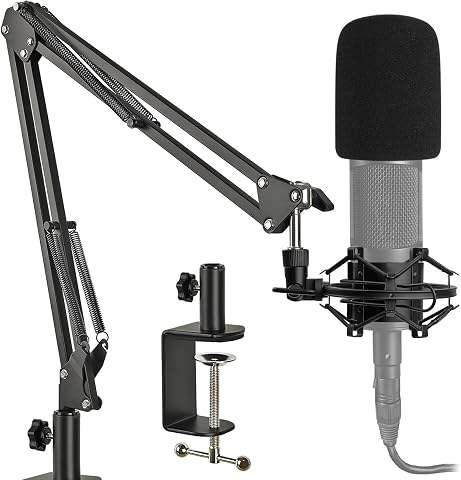
This adjustable steel boom arm rotates 360° and supports microphones weighing up to 1.5 kg. The kit includes a shock mount, desk clamp with an anti-scratch pad, and a foam windscreen to help reduce vibration, plosives, and wind noise during recording or broadcasting.
Pros:
- Adjustable arm with 360° rotation
- Shock mount helps reduce vibration noise
- Desk clamp has an anti-scratch pad
- Includes a foam windscreen
Cons:
- Windscreen is specified for the Audio-Technica AT2020 microphone
- Clamp fits desks up to 2.4 inches thick
Best for: Recordists whose microphone fits the kit’s mount and windscreen
Not ideal for: Anyone who has not confirmed microphone and mounting compatibility
Bottom line: Verify every fit point before using this kit for microphone placement and wind protection.
Closed-back headphones
Closed-back headphones give you a way to monitor recordings while limiting how much outside sound reaches your ears. The listed pick is the Focal Lensys Professional Closed-Back Headphones. Check that their connection works with your recorder or monitoring device, including whether any adapter is needed, and consider whether the fit is comfortable for the length of your sessions.
A common mistake is choosing headphones without checking the monitoring chain. Confirm the plug and any adapter requirements, then make sure the recorder or interface can drive the headphones at a useful listening level. Think about how you will monitor in the field: you may need to hear both the recording and your surroundings, so consider the setting and the listening approach that suits it. Comfort and portability matter too if you expect to wear or carry the headphones for extended sessions.
Try the headphones with your intended source and check that you can hear the details you need to assess. Plan where they will be stored between takes, and keep the cable from snagging on other gear. Test the connection and listening level before the session so monitoring is ready when you need it.
What to look for:
- A plug and connection compatible with your recorder or monitoring device
- Any adapters required by the setup
- A comfortable fit for the expected session length
- A useful listening level from the intended source
- A practical way to carry and store the headphones
Focal Lensys Professional Closed-Back Headphones

Focal’s Lensys Professional headphones feature dual aluminum/magnesium drivers and sound isolation design, providing detailed monitoring and authentic playback. They are designed for studio use, monitoring, and casual listening, with soft memory foam earpads and a sturdy headband for comfort.
Pros:
- High-quality aluminum/magnesium drivers deliver detailed sound
- Effective sound isolation for studio and casual use
- Comfortable soft memory foam earpads and sturdy headband
- Suitable for monitoring, recording, and playback
Cons:
- Wired connection may limit mobility
- Lack of foldable design for portability
- No water resistance for outdoor use
Best for: Recordists who want closed-back headphones in their field kit
Not ideal for: People whose source connection or monitoring needs do not match the headphones
Bottom line: Check the connection, comfort, and monitoring level with your intended recording device.
Microphone stand
A microphone stand helps keep the microphone in a repeatable position, but the supplied pick is named Portable Bluetooth Party Speaker with Two Wireless Microphones. That product name describes a speaker and wireless microphones rather than a conventional stand, so confirm the actual mounting arrangement before treating it as support for a separate microphone.
The main buying mistake here would be assuming that a product with microphones includes a stand or mount suited to another microphone. Check what is physically included, how the wireless microphones are held or positioned, and whether the package provides a way to secure a microphone at the height and angle your recording needs. Also check how the system connects to your recorder: a Bluetooth speaker setup may not provide the connection or monitoring path your field recording workflow expects.
If you need a stand for a separate microphone, verify that the product can provide that function before selecting it for this slot. Consider the microphone’s size and mount, the stability of the support, and how the setup will be carried. Confirm the role this product can serve in your kit before building the rest of the arrangement around it.
What to look for:
- Whether a microphone stand or mount is actually included
- A support arrangement compatible with your microphone
- Stable positioning at the needed height and angle
- Connections compatible with your recorder workflow
- Clear details on what is included in the package
Portable Bluetooth Party Speaker with Two Wireless Microphones
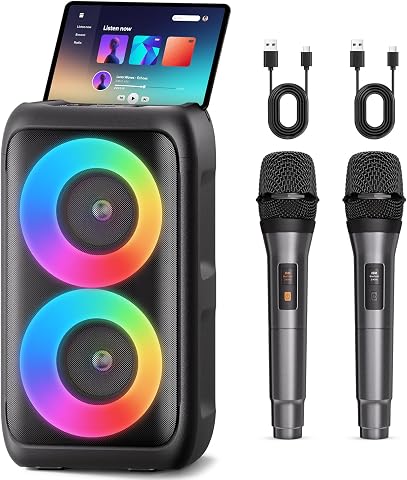
This portable Bluetooth speaker includes two auto-pairing wireless microphones with a stated range of up to 50 feet, plus Bluetooth 5.3, TWS pairing, AUX, TF card, and USB connectivity. It features dual subwoofers, colorful adjustable lights, a rechargeable battery rated for up to 10 hours of playback, and a built-in handle for carrying to parties and outdoor events.
Pros:
- Includes two wireless microphones for karaoke and presentations.
- Supports multiple input options and TWS stereo pairing.
- Portable design with a built-in handle and up to 10 hours of stated playback.
- Adjustable colorful lights add visual effects for parties.
Cons:
- TWS stereo sound requires a second compatible speaker.
- The listed weight and dimensions differ between the description and product information.
Best for: Buyers seeking a portable speaker and wireless microphones
Not ideal for: Recordists who need a conventional stand for a separate microphone
Bottom line: Confirm that the product includes usable microphone support before assigning it to the stand slot.
Rechargeable AA batteries
Reliable power planning keeps a field session from being interrupted by depleted cells. The supplied pick is Energizer Ultimate Lithium AA Batteries (24 Pack). Its name identifies AA lithium batteries, not rechargeable batteries, so check the device manual for the approved battery type and confirm whether these cells suit your recorder and accessories.
A common mistake is buying by size alone. AA describes a form factor, but it does not confirm that a particular device accepts lithium cells or that the cells meet its requirements. Check each device’s manual, note which items use AA batteries, and plan how you will track fresh and used cells. If your goal is specifically to recharge cells between sessions, verify that the selected battery type and charger are designed for that use; do not assume rechargeability from the checklist heading.
Pack power for the gear you actually plan to use and keep batteries organized so you can distinguish ready cells from depleted ones. Check polarity when installing them and follow the device maker’s handling guidance. Verify the battery type before relying on this pack for a recorder or other field equipment.
What to look for:
- Battery chemistry and type approved by each device manual
- AA size only where the device specifies AA cells
- A clear plan for tracking fresh and used batteries
- A charger designed for the selected cells if recharging is required
- Enough compatible power for the planned gear
Energizer Ultimate Lithium AA Batteries (24 Pack)

These Energizer AA lithium batteries are designed for long-lasting, reliable power in critical devices such as cameras, remote controls, and smart home systems. They feature leak-proof construction, perform in extreme temperatures, and can last up to 25 years in storage, making them ideal for backup power and outdoor use.
Pros:
- Long-lasting power with up to 25 years of storage life
- Leak-proof and corrosion-resistant design
- Performs reliably in extreme temperatures
- Ideal for critical devices and outdoor use
Cons:
- Single-use batteries may generate waste
- Higher cost compared to standard alkaline batteries
- Not rechargeable
Best for: Users whose equipment manuals specify compatible AA lithium cells
Not ideal for: Anyone specifically seeking rechargeable AA batteries
Bottom line: Confirm the cells are approved for your equipment and note that this pick is identified as lithium, not rechargeable.
Build the kit in a practical order: first confirm the recorder and microphone connections, then choose the microphone approach and the support or wind protection it needs. Add monitoring headphones that work with your source, and finish by checking the correct power type for every device.
Use the compatibility checks as a quick pre-session routine, then test the complete setup before you head out. A few careful checks make it easier to focus on the sounds you want to capture.
Black Friday Picks

Sony WH-1000XM6 Wireless Noise-Canceling Headphones, Black
As an affiliate, we earn on qualifying purchases.