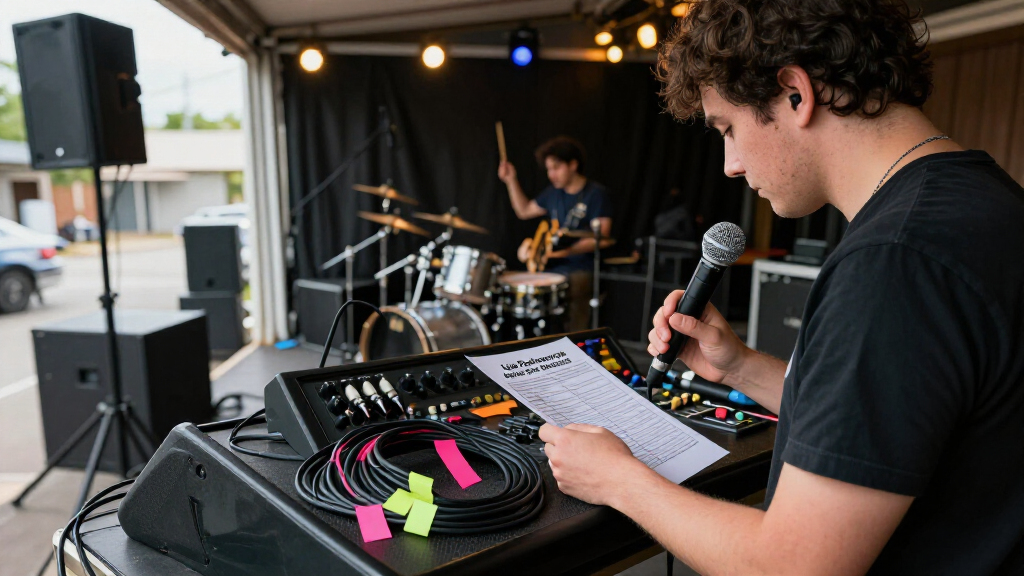
This checklist is for bands, solo performers, and small production teams assembling or refreshing live performance audio gear. It covers the key connections between microphones, monitoring, mixing, and stage setup, with advice for choosing equipment that fits the way you perform. Start with your setup: consider who needs to hear what, how many inputs you use, and what your venue can support.

Get audio and creator gear delivered free — and shop member deals
- Fast, free delivery on millions of items
- Access to Prime Big Deal Days deals on October 6–7
- Prime Video, Amazon Music and more included
The sections follow common gear slots, from wireless microphones and stage monitors to a digital mixer, DI box, microphone stand, and in-ear monitoring. Each pick is named as provided, and the DI box section offers selection guidance without a product pick. Check the full signal path as you read: a useful component still needs to work with the rest of your rig.
Use the checklist to compare requirements before you buy. Confirm connectors, channel needs, placement, and the equipment you already own; then check the manufacturer’s specifications for fit and compatibility. Plan around your actual stage, including performer count, available space, and who will set up and operate the system.
Wireless Microphone System
A wireless microphone system can reduce cable runs for performers who move around the stage, but the right choice depends on how many people need microphones and how the system fits your audio setup. The listed pick is the Phenyx Pro Dual True Diversity Auto Scan Wireless Microphone System PT. Treat the product name as a starting point: verify the included components, supported frequency options, outputs, and the microphone configuration in the current manufacturer specifications. Match the system to your input plan before adding it to a mixer with limited available channels.
A common buying mistake is choosing a system without checking the venue’s wireless environment or the receiver’s connection requirements. Confirm that the frequencies can be used where you perform, and check how the receiver connects to your mixer or other audio gear. Consider receiver placement and whether you can keep its antennas positioned as directed. Check local frequency requirements and plan a sound check that includes movement through the areas performers will use. For multiple wireless systems, confirm they can operate together under the conditions at your venues.
Before purchasing, verify what accessories are included and whether the microphones suit the performers’ handling preferences. Confirm power needs, output connections, and storage or transport requirements. Test the complete path from microphone to receiver to mixer, rather than assuming that matching brand names or product categories guarantee compatibility.
What to look for:
- Confirm the number and type of microphones and receiver components included.
- Check receiver outputs against available mixer inputs and connection types.
- Verify frequency options and suitability for your performance locations.
- Review power, antenna placement, and setup requirements.
- Test the full system with other wireless equipment you plan to use.
Phenyx Pro Dual True Diversity Auto Scan Wireless Microphone System PTAU-2

The Phenyx Pro PTAU-2 is a dual-channel wireless microphone system featuring auto frequency scan, ID lock, and true diversity technology for stable and clear audio. It offers versatile settings with adjustable transmitter power and receiver sensitivity, suitable for various performance environments.
Pros:
- Provides stable and clear audio with advanced frequency management.
- Versatile with adjustable power and sensitivity for different environments.
- Includes comprehensive accessories for easy setup and use.
Cons:
- Complex setup may require technical knowledge.
- Limited to UHF frequency band, which may not be suitable for all regions.
- No price information available.
Best for: Performers who need a wireless microphone setup and have confirmed its channel and frequency fit.
Not ideal for: Rigs that need a different microphone count, connection, or frequency arrangement.
Bottom line: Confirm the included components, usable frequencies, and mixer connections before choosing this wireless system.
Stage Monitor Speaker
Stage monitors let performers hear the parts of the mix they need while playing, singing, or speaking. The listed pick is the Seismic Audio FL-12MP-PW Pair of Powered 2-Way 12" Floor/Stage Monitor. A pair may suit a setup that needs two monitor positions, but confirm the actual inputs, outputs, controls, and included accessories before planning your signal routing. Decide who needs a monitor mix and where each speaker will sit before settling on a pair.
A frequent mistake is assuming that powered monitors will connect directly to every mixer output or that one mix will work for the whole stage. Check the monitor’s input connections and the mixer’s available outputs, then determine whether performers need separate mixes. Confirm the monitor’s dimensions and placement options against the stage footprint, microphone positions, and foot traffic. Plan the routing and placement together: a suitable connection is only useful if the speaker can be positioned safely and aimed appropriately.
For compatibility, review the manufacturer’s specifications for power requirements, signal connections, and any linking or output functions. Verify that your mixer or other source can provide the required signal. Consider transport and storage, especially if the monitors will move between venues. Rehearse at performance volume and adjust placement and mix levels to suit the room; the product name alone cannot establish how a speaker will behave in your venue.
What to look for:
- Check input connections against the mixer’s monitor outputs.
- Confirm whether one shared mix or separate mixes are needed.
- Measure the stage area and verify speaker placement and clearance.
- Review power requirements and any signal-linking options.
- Confirm what cables and accessories are included.
Seismic Audio FL-12MP-PW Pair of Powered 2-Way 12" Floor/Stage Monitors with Tit

This pair of powered 2-way 12-inch floor/stage monitors is designed for live sound, stage, and studio applications. They feature titanium horns and are suitable for professional audio setups.
Pros:
- High-quality 12-inch speakers suitable for live performances
- Powered design simplifies setup with built-in amplification
- Titanium horns enhance sound clarity
Cons:
- No specific power output details provided
- Potentially heavy for portable use
- Limited information on additional features
Best for: Setups that need two powered floor monitors and have compatible mixer outputs.
Not ideal for: Stages with limited floor space or a need for a different monitoring arrangement.
Bottom line: Confirm routing, placement, and power details before building your monitor setup around this pair.
Digital Audio Mixer
A digital mixer is the routing and control center for a live audio rig, so its input and output needs should guide the choice. The listed pick is the Allen & Heath QU-32C 38 In/28 Out Compact Digital Mixer, Chrome Editio. Verify the exact model name and current specifications, including the number and type of usable connections and how those counts are defined. Count your sources and destinations before deciding whether the mixer suits your stage.
One common mistake is treating a headline input or output count as a guarantee that every connection will work for the intended purpose. Map microphones, playback sources, stage monitors, recording feeds, and other devices to the mixer’s actual inputs and outputs. Check connector types and any routing or setup requirements for the configurations you plan to use. Build a channel and output map for a typical performance, then leave room for the sources you regularly add.
Also consider who will operate the mixer and how it will be positioned during a show. Confirm the control method, power and transport requirements, and any included or separately required components in the manufacturer documentation. If you rely on recordings, remote control, or external equipment, check those specific workflows rather than inferring support from the product name. Rehearse the planned configuration before relying on it at a venue, and label channels and outputs so setup is repeatable.
What to look for:
- Match actual input types and counts to every planned source.
- Map outputs for monitors, recording, and other destinations.
- Check connector formats and routing requirements for your setup.
- Confirm operating, power, transport, and control requirements.
- Verify support for any external equipment or workflows you depend on.
Allen & Heath QU-32C 38 In/28 Out Compact Digital Mixer, Chrome Edition, Black

The Allen & Heath QU-32C is a compact digital mixer featuring 32 analog preamps with zero crossing detection, a 5-inch touchscreen, and 33 motorized faders for versatile control. It offers advanced effects, scene recall, USB audio streaming, and a dedicated mixing app, making it suitable for professional live sound applications.
Pros:
- High-quality analog preamps with zero crossing detection
- Intuitive touchscreen and motorized faders for easy control
- Versatile features including effects, scene recall, and USB streaming
- Compact design suitable for professional use
Cons:
- Complex setup may require some learning curve
- Premium price point might be high for beginners
Best for: Teams that need to plan multiple sources and outputs around a digital mixer.
Not ideal for: Simple setups that do not need its planned input and output capacity.
Bottom line: Use a detailed channel map and verify the current specifications before committing to this mixer.
DI Box
A DI box can help connect an instrument-level source to a sound system, but the right type depends on the source, destination, and cable run. No product pick is listed for this slot, so use your rig’s requirements to guide the search. Start with the instrument and output: passive and active instruments, keyboards, and other sources can call for different features, and the equipment’s documentation is the best guide.
A common mistake is buying based only on connector appearance. Check whether you need a passive or active DI, whether the source requires a high-impedance input, and whether the box offers the connections and functions your setup calls for. Determine whether you need one channel or more, and whether features such as a ground lift or through connection are relevant. Trace the signal path from source to stage box or mixer, including the cable length and the connections at both ends.
For compatibility, confirm the DI’s input and output formats against your instrument and sound system, and check any power requirements for active models. If you use stereo sources, make sure the selected solution supports the intended routing. Ask the venue or engineer how the stage inputs are configured when that information is available. Test with your actual instrument and cables before a show so you can catch level, noise, or connection issues during rehearsal.
What to look for:
- Choose passive or active operation to suit the source and its requirements.
- Match input and output connections to the instrument and mixer or stage box.
- Confirm channel count for mono or stereo sources.
- Check for needed features such as a through output or ground lift.
- Review power needs and test with the actual instrument and cables.
Microphone Stand
A microphone stand affects placement, stability, and how easily a performer can use a microphone. The listed pick is the LyxPro SMT-1 Professional Microphone Stand Heavy Duty 93" Studio Overh. Confirm the exact configuration from the manufacturer, since the product name alone does not establish its base, adjustment range, or included hardware. Match the stand to the microphone position and the performer’s movement before selecting it.
A common buying mistake is focusing on maximum height without checking the stand’s footprint, reach, or adjustment method. Measure the intended position and verify that the stand can place the microphone where needed without blocking walkways or interfering with instruments. Check the microphone clip or holder requirements and confirm whether the needed adapter is included. Check reach and clearance for overhead or extended placements, and consider how the stand will behave on the surfaces where you perform.
For fit and compatibility, compare the stand’s threads and attachment points with your microphone clip, shock mount, or other hardware. Review how it folds or breaks down for transport, and whether its parts suit your setup routine. If performers adjust stands themselves, make sure the adjustment controls are practical to reach and understand. Set it up with the intended microphone and check stability, clearance, and cable routing before using it on stage.
What to look for:
- Verify the stand’s configuration, adjustment range, and footprint.
- Check reach and clearance for the planned microphone position.
- Match mounting threads and hardware to the microphone clip or mount.
- Confirm included adapters and accessories.
- Review setup, stability, and transport requirements.
LyxPro SMT-1 Professional Microphone Stand Heavy Duty 93" Studio Overhead Boom S

The LyxPro SMT-1 is a heavy-duty professional microphone stand featuring an adjustable overhead boom and telescoping arm, suitable for vocals, instruments, and studio setups. Its foldable design allows for easy storage and transport, with a sturdy construction that supports various microphone sizes and setups.
Pros:
- Adjustable height and boom arm for versatile positioning
- Heavy-duty construction supports various microphone sizes
- Foldable design for easy storage and transport
- Includes necessary accessories like mic clips and XLR cable
Cons:
- May be heavier than lightweight stands
- Some users might find assembly instructions unclear
- Price not specified in the description
Best for: Setups that need the verified stand configuration and reach for their microphone placement.
Not ideal for: Positions where its footprint or adjustment range does not fit the stage.
Bottom line: Verify reach, mounting compatibility, and stability with your microphone before relying on this stand.
In-Ear Monitor System
In-ear monitoring lets performers use earpieces to hear a monitor mix, and the system must work with the transmitters, receivers, and antennas in the rig. The listed pick is the Phenyx Pro Wireless Antenna Combiner for In-Ear Monitor System PAS-227. Its product name identifies it as an antenna combiner, so do not assume it is a complete in-ear monitor system. Confirm the exact role of this component and the equipment it is intended to support before purchase.
A common mistake is treating a combiner as a transmitter or assuming it will work with wireless units from any manufacturer. Check the manufacturer’s compatibility information for the PAS-227 and the transmitters you own or plan to use. Verify the required connections, supported configuration, antenna arrangement, and any power or mounting needs. Match every connection and device in the intended chain, including the antenna and transmitters.
Also plan how many performers need in-ear mixes and what equipment supplies those mixes. Confirm that the mixer has the outputs and routing needed for the transmitters, and that the receivers and earpieces are covered by your wider system plan. Review the venue’s wireless conditions and any relevant frequency requirements. Test the complete monitoring chain with the actual transmitters and receivers; a combiner by itself does not provide the full listening setup.
What to look for:
- Verify that the combiner is specified for your transmitter models.
- Check connections, antenna arrangement, and supported configuration.
- Confirm power and mounting requirements.
- Map mixer outputs and routing for the intended in-ear mixes.
- Plan compatible transmitters, receivers, and earpieces for performers.
Phenyx Pro Wireless Antenna Combiner for In-Ear Monitor System PAS-227X
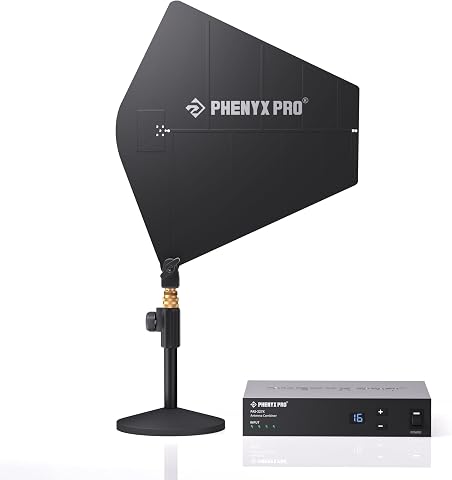
The PAS-227X antenna combiner supports four inputs, seamlessly merging signals into a single output to reduce noise and extend range. It features adaptive gain adjustment, wide bandwidth compatibility (460-970MHz), and easy setup with LED indicators and rack-mount options, making it ideal for live performances and large events.
Pros:
- Supports four antenna inputs for reliable signal management
- Wide bandwidth compatibility with most IEM systems
- Adjustable gain with LCD display for easy monitoring
- Compact half-rack design for space-saving setup
Cons:
- Requires some technical knowledge for optimal setup
- Limited to specific frequency range (460-970MHz)
- No mention of weather resistance for outdoor use
Best for: Users whose transmitters are confirmed compatible with this antenna combiner.
Not ideal for: Anyone seeking a complete wireless in-ear monitoring system from this pick alone.
Bottom line: Verify transmitter compatibility and plan the rest of the in-ear signal chain separately.
Build your purchasing order around the parts that determine whether the rest of the system can work: first map sources, mixer inputs and outputs, and the monitor plan; then identify connection or wireless requirements that affect multiple components. Prioritize compatibility first, followed by the gear that fills a clearly defined gap. Add stands and supporting accessories after confirming placement, mounting, and transport needs.
You do not have to assemble every part at once. Write down your current equipment, the connections you need, and the questions to verify in manufacturer documentation, then work through the checklist one slot at a time. A clear stage plan makes it easier to choose gear that fits your performers and venues—and to walk into rehearsal ready to refine the setup.
Fall Picks
fall essentials
As an affiliate, we earn on qualifying purchases.